
Kimi K3 API: How to Access Moonshot AI’s Flagship Model (Endpoints, Auth, SDKs, Pricing)
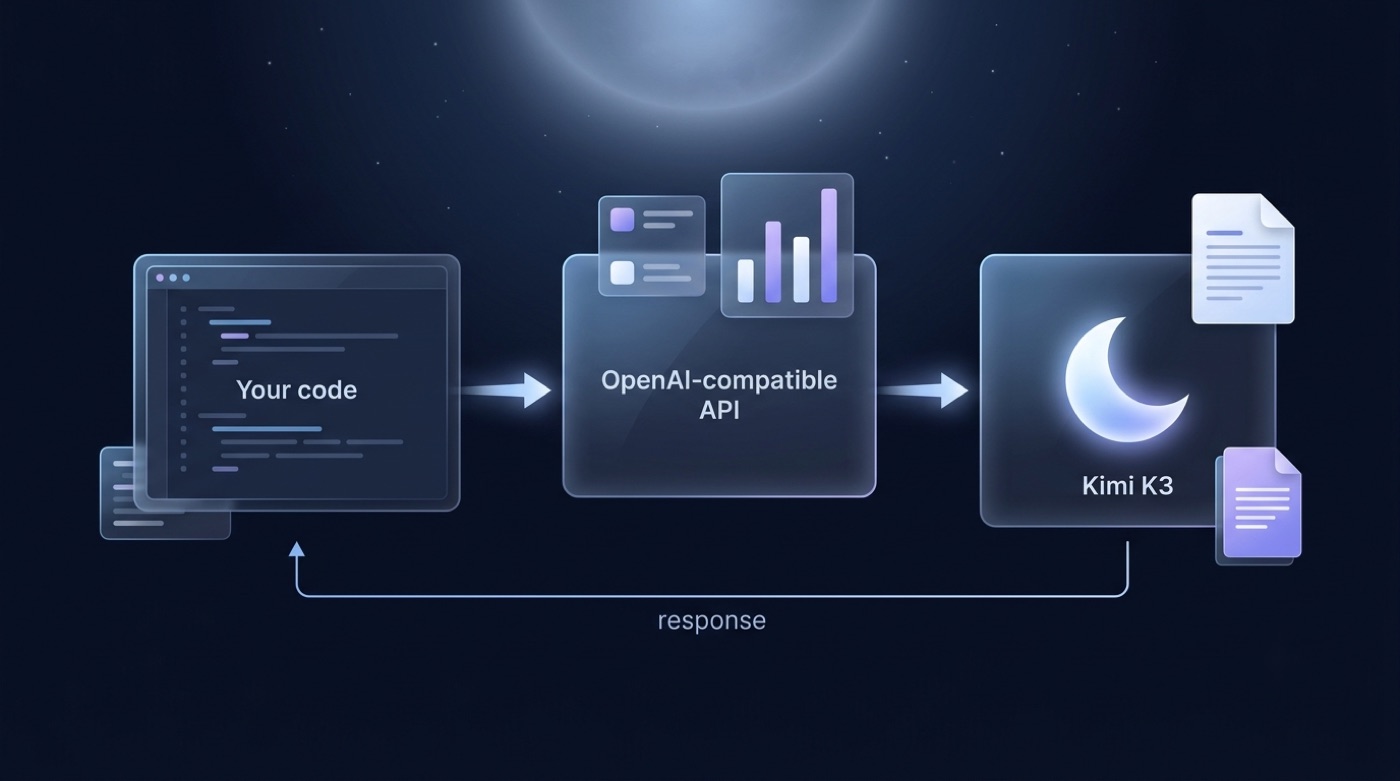
Kimi K3 is Moonshot AI’s newest flagship LLM, and you reach it programmatically through the same OpenAI-compatible API that already serves the Kimi family. If you’d rather skip the setup and try Kimi K3 in a browser first, that works too — this guide covers the endpoint, auth, SDKs, models, pricing, limits and region availability for developers who want to call it from code.
The short version: point your requests at base URL https://api.moonshot.ai/v1, use model id kimi-k3, and authenticate with a Bearer API key generated in the console. Moonshot documents the full surface at platform.moonshot.ai, and because the API mirrors OpenAI’s Chat Completions format, most existing OpenAI client code needs only a base_url and api_key change to run against Kimi K3.
kimik3.pro is an unofficial, free chat and reference site — it is not affiliated with, endorsed by, or operated by Moonshot AI. Specs and pricing referenced below are launch-window figures pulled from third-party listings; always confirm current numbers in Moonshot’s official console before you build anything that depends on them.
What Is Kimi K3 and Who Provides the API?
Kimi K3 is developed and served by Moonshot AI, the company behind the Kimi chatbot and model family. Understanding who’s behind the API — and what came before K3 — helps explain why the interface looks the way it does.
Moonshot AI, the company behind Kimi
Moonshot AI is a Beijing-based artificial intelligence company founded in March 2023 by CEO Yang Zhilin along with co-founders Zhou Xinyu and Wu Yuxin. The company is frequently grouped among China’s so-called “AI Tigers,” a cohort of well-funded LLM startups. Its name is a nod to Pink Floyd’s album:
Moonshot AI “was launched on the 50th anniversary of the release of Yang’s favorite album, Pink Floyd’s The Dark Side of the Moon,” which inspired the company’s Chinese name, 月之暗面 — literally “dark side of the moon.”
Wikipedia — Moonshot AI
Moonshot AI builds the Kimi chatbot and the underlying Kimi model line, and it operates the platform.moonshot.ai developer console where API keys, usage and billing are managed. The Kimi chatbot’s Wikipedia entry covers the consumer-facing product built on the same model family.
From Kimi K2 to Kimi K3
Kimi K2, released in July 2025, is a 1-trillion-total-parameter Mixture-of-Experts (MoE) model with 32 billion active parameters per forward pass. Moonshot open-weighted K2 under a modified MIT license and shipped it with a context window that grew from 128K to 256K tokens. Kimi K3 is the newer flagship, announced afterward and positioned for long-horizon coding, agentic workflows and knowledge work, with native visual understanding added on top of the text capabilities K2 already had. Treat any specific K3 parameter count, context figure or release date you see outside Moonshot’s own docs as reported rather than confirmed, and check the console for what’s actually live on your account.
Is the Kimi K3 API OpenAI-Compatible?
Yes. Moonshot exposes Kimi K3 through a Chat Completions surface that mirrors the OpenAI API shape, which is the main reason migration from an existing OpenAI integration is usually a small diff rather than a rewrite.
Base URLs and the compatibility layer
You keep whichever OpenAI SDK you already use — Python, Node, or a raw HTTP client — and change two things: the base_url and the api_key. The two endpoints that matter for a typical integration are /v1/chat/completions for generation and /v1/models for listing what’s currently available on your account. Because the request and response bodies follow the OpenAI schema, parameters like messages, temperature and stream behave the way they do in an OpenAI integration, with a few Moonshot-specific fields layered on top (covered below).
Table: endpoints at a glance
| Region | Base URL | Notes |
|---|---|---|
| International | https://api.moonshot.ai/v1 | OpenAI-compatible; used by most non-China integrations |
| China | https://api.moonshot.cn/v1 | OpenAI-compatible; separate account/billing from the international endpoint |
How to Get a Kimi API Key
Every request needs a Bearer token tied to your Moonshot account, and keys are generated from the same console that shows usage and billing.
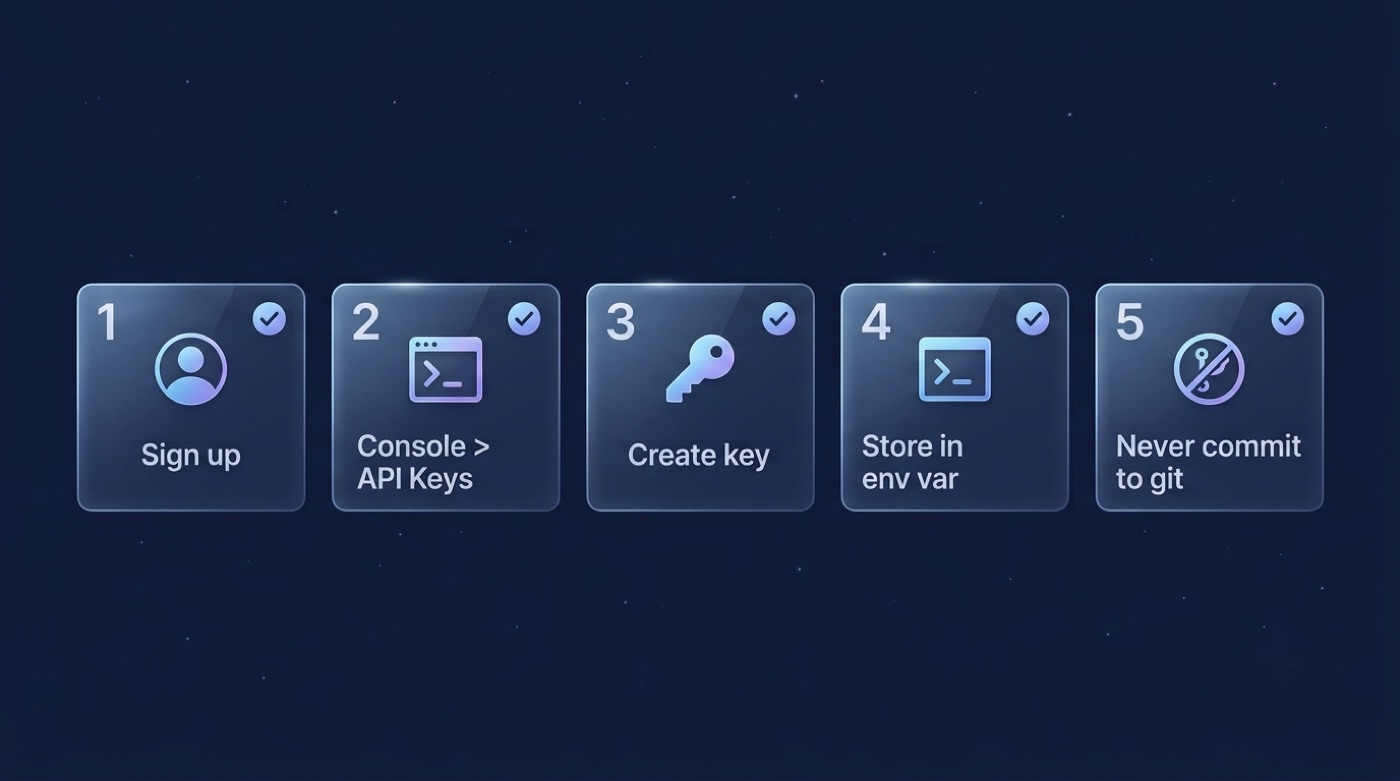
Steps to create and secure a key
- Sign up for an account at platform.moonshot.ai (or the China console at platform.moonshot.cn for mainland access).
- Open Console → API Keys.
- Click create, name the key, and copy it immediately — it’s typically shown only once.
- Store it in an environment variable, for example
MOONSHOT_API_KEY, rather than hardcoding it. - Never commit the key to git; add it to
.gitignoreif you keep a local.envfile. - Check whether your account needs a credit top-up before the key will accept live traffic — new accounts sometimes start at zero balance.
Keys are scoped to your user account rather than to an individual project, and — as covered in the rate limits section below — Moonshot enforces its limits at the user level, not per key.
Calling Kimi K3: Code Examples
Once you have a key, calling kimi-k3 looks close to any other OpenAI-compatible chat completion call. Below are Python, Node.js and raw curl versions of the same request.
Python (OpenAI SDK)
import os
from openai import OpenAI

client = OpenAI(
    api_key=os.environ["MOONSHOT_API_KEY"],
    base_url="https://api.moonshot.ai/v1",
)

response = client.chat.completions.create(
    model="kimi-k3",
    messages=[
        {"role": "system", "content": "You are a helpful coding assistant."},
        {"role": "user", "content": "Explain what a Bearer token is in one sentence."},
    ],
    temperature=0.6,
)

print(response.choices[0].message.content)
Node.js (openai package)
import OpenAI from "openai";

const client = new OpenAI({
  apiKey: process.env.MOONSHOT_API_KEY,
  baseURL: "https://api.moonshot.ai/v1",
});

const response = await client.chat.completions.create({
  model: "kimi-k3",
  messages: [
    { role: "system", content: "You are a helpful coding assistant." },
    { role: "user", content: "Explain what a Bearer token is in one sentence." },
  ],
});

console.log(response.choices[0].message.content);
curl
curl https://api.moonshot.ai/v1/chat/completions \
  -H "Authorization: Bearer $MOONSHOT_API_KEY" \
  -H "Content-Type: application/json" \
  -d '{
    "model": "kimi-k3",
    "messages": [
      {"role": "user", "content": "Explain what a Bearer token is in one sentence."}
    ]
  }'
Common request parameters
model— the model id, e.g.kimi-k3.messages— the standard OpenAI-style chat array (system/user/assistant roles).temperature— sampling randomness, same semantics as OpenAI.max_tokens/max_completion_tokens— caps output length; Moonshot’s rate-limit accounting is tied tomax_completion_tokens, so setting it deliberately matters more here than it does on some other providers.stream— set totruefor server-sent-event streaming responses.tools— function/tool-calling definitions, following the OpenAI tool-call schema.
Models, Context and Parameters
The model id you’ll use most is kimi-k3, but Moonshot’s account may expose sibling ids from the same family (for example previous-generation Kimi K2 variants) alongside it.

Available model ids
Rather than hardcoding a single id and hoping it stays valid, call GET /v1/models against your base URL to pull the authoritative, live list of models your account can access. This matters because Moonshot has iterated the Kimi line quickly — a hardcoded id from a tutorial can go stale faster than the endpoint itself changes.
Table: Kimi models overview (reported figures)
| Model id | Context (reported) | Modality | Positioning |
|---|---|---|---|
kimi-k3 | ~1M tokens — listed on OpenRouter at launch, verify in console | Text + vision | Long-horizon coding, agentic workflows, knowledge work |
kimi-k2 (prior generation) | 128K → 256K tokens | Text | General-purpose MoE, open-weighted (modified MIT) |
Pricing and Tokens
Moonshot bills per token, with separate rates for input and output, and — like most providers — cached-input pricing can differ from a cold read of the same tokens.
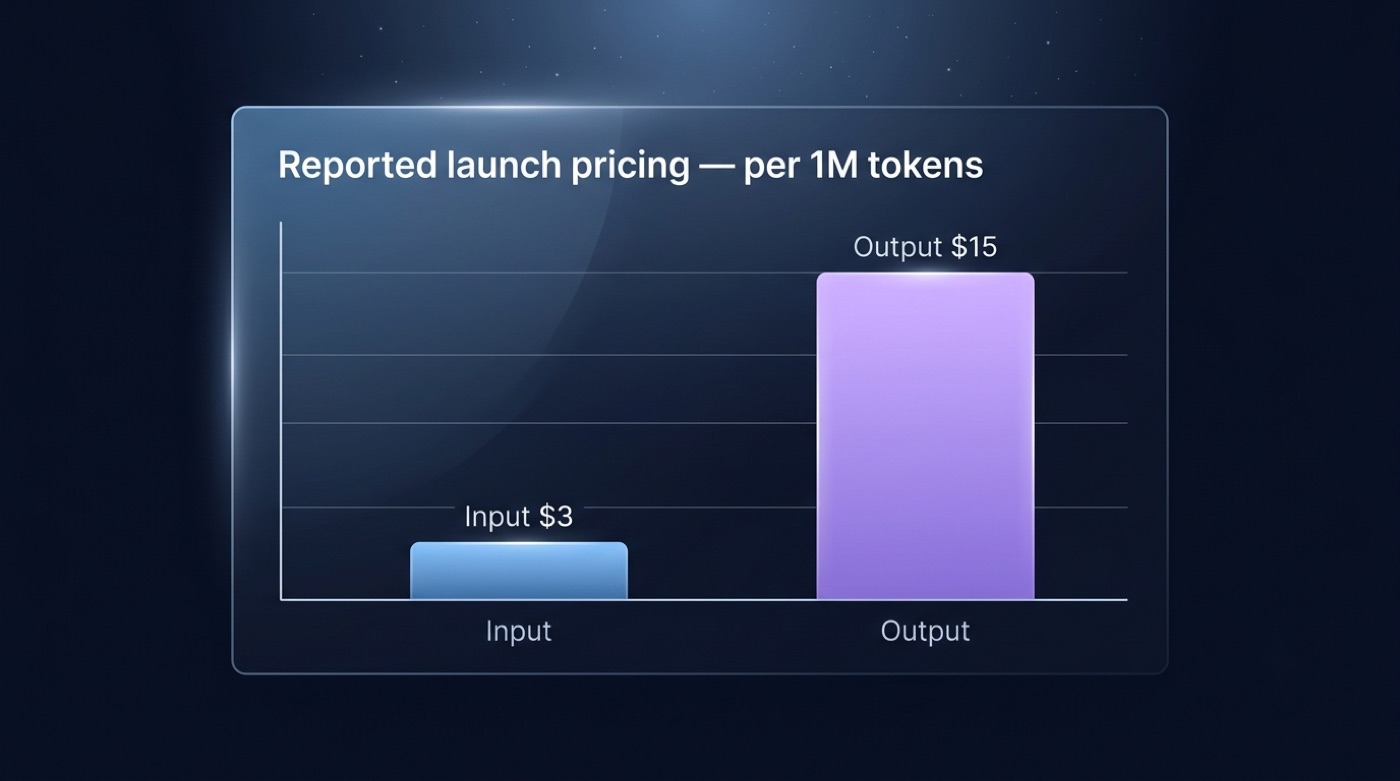
How Moonshot bills
- You pay per input token and per output token, tracked separately rather than as a single blended rate.
- Output tokens are typically priced higher than input tokens, which is standard across the industry.
- Cache-hit discounts may apply if your requests repeat a common prefix (e.g. a stable system prompt); check the console for whether and how this applies to
kimi-k3. - Launch-window third-party listings — OpenRouter’s Kimi K3 model page reported roughly $3 per million input tokens and $15 per million output tokens at launch — are a useful reference point, not a guarantee; Moonshot’s own console is the source of truth for what you’ll actually be billed.
- Budget for both sides of a conversation: long system prompts and retrieved context count as input tokens even when the model’s final answer is short.
Rate Limits and Errors
Moonshot enforces limits across four dimensions, and — unlike some providers — those limits apply at the user account level rather than per individual API key.
The four limit dimensions
| Limit type | What it measures |
|---|---|
| Concurrency | How many requests can be in flight for your account at once |
| RPM | Requests per minute |
| TPM | Tokens per minute (counts against max_completion_tokens accounting) |
| TPD | Tokens per day |
Exceeding any of these returns a 429 error. Very long-running requests that exceed roughly a two-hour timeout window can also return a 504, so extremely long generations or slow streaming consumers should account for that ceiling.
Handling 429s
- Implement exponential backoff with jitter rather than retrying immediately.
- Respect any retry-after guidance the API returns instead of guessing an interval.
- Cap
max_completion_tokenson requests that don’t need long outputs — since limits are tracked against this field, tighter caps reduce how fast you burn through TPM/TPD. - Batch non-urgent workloads during off-peak hours if you’re consistently hitting ceilings.
- Request a higher rate-limit tier through the console if your production traffic genuinely needs more headroom than the default account allows.
Region Availability and Third-Party Access
Kimi K3 is reachable through two direct Moonshot endpoints depending on region, plus at least one third-party aggregator that routes to Moonshot as the underlying provider.
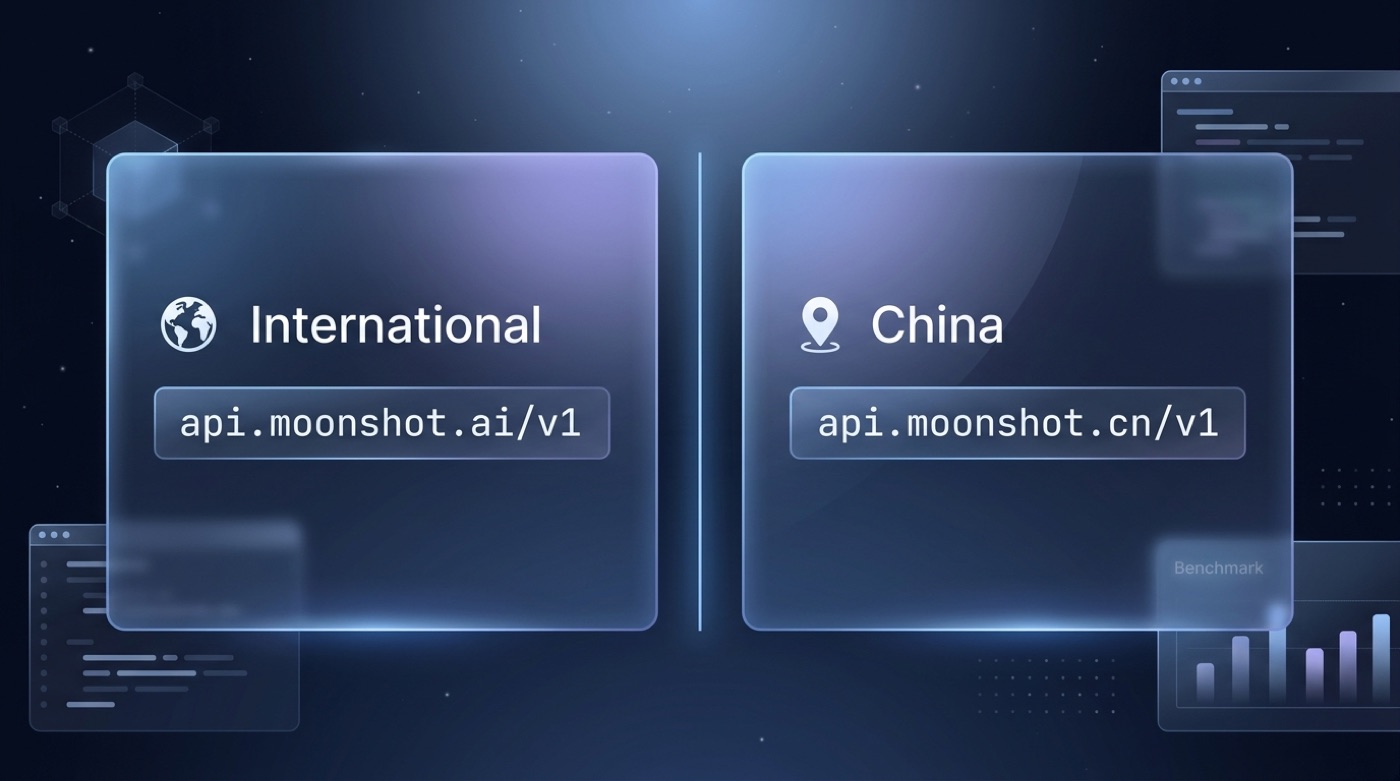
Direct vs aggregator access
Direct access splits by region: api.moonshot.ai serves international traffic, while api.moonshot.cn serves mainland China with its own account and billing. If you’d rather not manage keys and billing at all, you can also use the Kimi K3 chat directly in the browser with no API setup. On the aggregator side, OpenRouter lists moonshotai/kimi-k3 with Moonshot AI as the sole backing provider, which can be convenient if you already route other models through OpenRouter and want one billing surface — though actual availability can still vary by account and region.
Migrating from OpenAI or Kimi K2
If you already have an OpenAI-compatible integration — whether it’s calling OpenAI directly or an earlier Kimi K2 deployment — switching to kimi-k3 is mostly a configuration change rather than new code.
Migration checklist
- Point
base_urlathttps://api.moonshot.ai/v1(or.cnfor the China endpoint). - Swap in your Moonshot
api_key, stored via environment variable. - Set
modelto"kimi-k3". - Map any
max_tokensusage tomax_completion_tokenswhere Moonshot expects it, since rate-limit accounting keys off that field. - Re-test tool/function calls and streaming responses — schema compatibility is close but worth confirming against your specific tool definitions.
- Confirm current pricing and rate-limit tier in the console before shipping to production.
If you’re coming from Kimi K2 specifically, the change is even smaller: keep your existing base URL, key and request shape, and just swap the model field to Kimi K3.